

Artificial intelligence is changing the way digital products are created. Product teams can now generate interface concepts, explore user flows, analyze research, create prototypes, write code, and test ideas faster than before. These capabilities can reduce the time needed to move from an idea to a working product. Speed, however, does not guarantee a better product.
A product can still solve the wrong problem. A fast prototype can still create a confusing user experience. AI can generate hundreds of design options without telling a team which option users actually need.
For founders, the important question is not whether AI should be used in product design. The better question is
How can AI improve the product design process without replacing the research, strategy, and human decisions that make a product useful?
This guide explains how AI is changing product design, where it can help, where teams need human judgment, and how founders can build an AI-ready product design process.
What Has Changed in Product Design?
Traditional product design often follows a structured process:
Research → Strategy → UX → UI → Prototype → Testing → Development → Launch
AI can support almost every stage of this process. It can help teams:
- Analyze large amounts of user feedback
- Identify common problems in customer conversations
- Generate user flow ideas
- Create early interface concepts
- Explore different design directions
- Create prototypes faster
- Generate content for interfaces
- Support usability testing
- Assist developers during implementation
- Analyze product data after launch
The role of the product designer is changing as a result. Designers spend less time producing every design element manually. More time can go into understanding problems, evaluating ideas, making decisions, and improving the overall product experience. That shift makes product thinking more important, not less important.
How AI Is Changing the Product Design Workflow
AI does not need to replace the existing product design process. It can make each stage more efficient. A practical AI-supported product workflow can look like this:
DISCOVER → DEFINE → EXPLORE → PROTOTYPE → VALIDATE → DESIGN → BUILD → MEASURE → IMPROVE
Each stage still needs a clear objective.
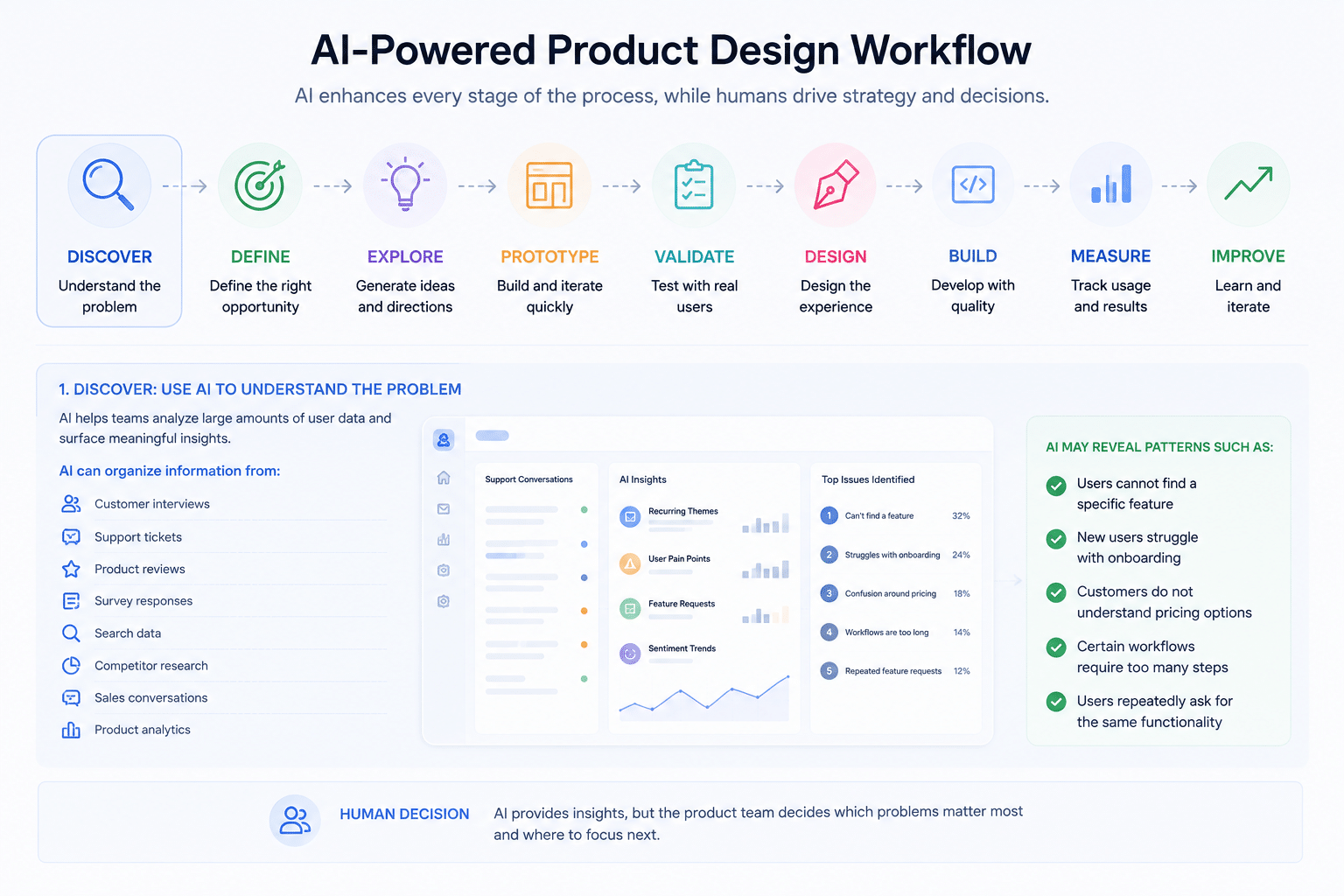
1. Discover: Use AI to Understand the Problem
Product design starts with understanding users. AI can help teams organize information from:
- Customer interviews
- Support tickets
- Product reviews
- Survey responses
- Search data
- Competitor research
- Sales conversations
- Product analytics
For example, a SaaS company may have thousands of customer support conversations. Instead of reviewing every conversation manually, a team can use AI to identify recurring themes. The analysis may reveal patterns such as
- Users cannot find a specific feature
- New users struggle with onboarding
- Customers do not understand pricing options
- Certain workflows require too many steps
- Users repeatedly ask for the same functionality
AI can help identify these patterns. The product team still needs to decide which problems matter most.
2. Define: Turn Problems Into Product Opportunities
Once research is available, the team needs to define the problem clearly. A useful problem statement should answer:
- Who has the problem?
- What are they trying to accomplish?
- Where does the problem occur?
- Why does the problem matter?
- What business outcome does it affect?
AI can help teams compare research findings and create early problem statements. It should not decide the product direction on its own. A founder may discover that users are abandoning a particular workflow. AI can identify the pattern, but the team needs to understand why the workflow matters and what should change. This is where product strategy becomes important.
3. Explore: Generate More Product Ideas Faster
One of the biggest changes AI brings to product design is the speed of exploration. A designer can use AI to explore:
- Different navigation structures
- User flows
- Interface layouts
- Information architecture
- Content structures
- Interaction patterns
- Design directions
This can reduce the time needed to create early concepts. The goal should not be to accept the first AI-generated idea. The goal is to create more options and evaluate them. A strong product team asks:
- Does this solve the user’s problem?
- Is this easy to understand?
- Does this fit the business model?
- Can the product support it technically?
- Will the experience scale as the product grows?
AI can increase the number of ideas. Human judgment determines which ideas are worth pursuing.
4. Prototype: Move From Idea to Experience
Prototypes help teams understand how an idea works before development begins. AI tools can help create early prototypes faster. Teams can experiment with:
- Screen layouts
- User journeys
- Navigation
- Forms
- Dashboards
- Onboarding flows
- Mobile experiences
- SaaS workflows
This creates an important advantage for startups. Instead of spending weeks developing an idea that may not work, teams can create an early experience, test it, and make changes before committing significant development resources. For an MVP, this approach can reduce unnecessary work.
AI and MVP Development
AI is particularly useful during MVP development. An MVP should answer an important question:
What is the smallest useful product we can build to test our core assumption?
AI can help teams explore different MVP approaches and reduce the effort required to create early product concepts. But AI can also create a common problem.
Faster Development Can Create Bigger Products
When teams can build features quickly, they may add too much. This can lead to:
- Feature creep
- Complex navigation
- Unclear product positioning
- Higher development costs
- Longer onboarding
- Poor user experience
A good MVP still needs prioritization. The focus should remain on the core user problem. Before adding a feature, ask:
Does this feature help us validate the main product assumption?
If the answer is no, it may not belong in the first version.
AI in UX/UI Design
AI is also changing UX/UI design. Designers can use AI to support:
- Wireframing
- Interface exploration
- Content generation
- Visual direction
- Component creation
- Design variations
- Accessibility checks
- Responsive design exploration
- Usability analysis
This can make the design process faster. It does not remove the need for UX thinking. A visually attractive interface can still be difficult to use. Good UX depends on more than appearance. It requires an understanding of:
- User goals
- Context
- Behaviour.
- Information hierarchy
- Navigation
- Accessibility
- Product constraints
- Business objectives
AI can support these decisions. The product team still owns them.
Why Human-Centered Design Still Matters
AI learns from existing information. Users do not always behave according to existing patterns. They may have different needs, expectations, abilities, environments, and motivations. Human-centered design helps teams understand these differences. Direct user research remains important because it gives teams information that AI cannot simply generate from assumptions.
Useful research methods include:
- User interviews
- Usability testing
- Customer observation
- Surveys
- Journey mapping
- Competitive analysis
- Behaviour analysis
AI can organize and analyze research. It should not replace conversations with real users.
AI and Design Systems
As products grow, design consistency becomes harder to maintain. A design system can help teams manage:
- Buttons
- Forms
- Typography
- Colors
- Cards
- Navigation
- Components
- Interaction states
- Spacing
- Accessibility patterns
AI can help designers identify inconsistencies and generate component variations. It can also help teams work with large design systems more efficiently. For growing SaaS products, this becomes especially useful. A design system allows designers and developers to work from shared rules instead of creating each interface element from scratch. The result can be a product that feels more consistent as new features are added.
What About Vibe Coding and AI-Generated Products?
AI-assisted coding has made it easier for founders and teams to turn ideas into working interfaces. A founder can describe a product concept and generate an early version without writing every line of code manually. This can be useful for:
- Prototypes
- Internal tools
- Concept testing
- Early MVP experiments
- Proofs of concept
But there is an important distinction: A working product is not automatically a good product. AI-generated code can produce something that functions but still has problems with:
- UX
- Accessibility
- Scalability
- Performance
- Security
- Information architecture
- Design consistency
- Edge cases
Design and development still need to work together. AI can make the process faster. It does not remove the need for product decisions.
AI vs a Product Design Team: What Should You Use?
AI and human designers serve different purposes.
| Product Need | AI Can Help With | Human Team Should Handle |
|---|---|---|
| Research | Organizing large datasets | Understanding user context |
| Ideas | Generating concepts | Selecting the right direction |
| UX | Exploring flows | Evaluating usability |
| UI | Creating variations | Creating a coherent experience |
| Prototyping | Building early concepts | Testing the product experience |
| Design systems | Identifying patterns | Defining product standards |
| Development | Generating code | Architecture and technical decisions |
| Testing | Finding patterns | Understanding user behaviour |
| Strategy | Supporting analysis | Business and product decisions |
The strongest approach is not AI versus designers. It is AI plus experienced product thinking
When Should Founders Use AI in Product Design?
AI can be especially useful when the team needs to:
- Explore an idea quickly
- Analyze large amounts of information
- Create early concepts
- Build prototypes
- Test multiple design directions
- Speed up repetitive design work
- Organize research
- Support development
- Analyze product feedback
It becomes less useful when the team expects AI to:
- Define the entire product strategy
- Understand users without research
- Decide which features matter
- Replace usability testing
- Guarantee product-market fit
- Create a complete product without human review
The best results come when AI handles repetitive and analytical work while people handle judgment, strategy, empathy, and decisions.
How to Build an AI-Ready Digital Product
1. Start With a Clear Product Strategy
Before selecting tools, define:
- The target user
- The problem
- The value proposition
- The business model
- The primary user journey
- The main product goal
A clear strategy prevents AI from becoming a source of unnecessary features.
2. Build a Strong Design Foundation
Create clear:
- Information architecture
- User flows
- Design systems
- Components
- Interaction patterns
- Content structures
This makes future product changes easier.
3. Design for Scalability
A product may start with a few features. Over time, it can become much more complex. The design should account for:
- New features
- More users
- More data
- Different user roles
- New devices
- New workflows
4. Test Before You Scale
Do not wait until development is complete to discover UX problems. Use prototypes and usability testing early. A small change during design can prevent a much larger change during development.
5. Measure After Launch
Product design does not end at launch. Track:
- Activation
- Conversion
- Feature adoption
- Retention
- Task completion
- User drop-off
- Support requests
Use this information to identify where the experience needs improvement.
A Practical AI-First Product Design Process
For founders building a new digital product, the following process can create a strong balance between speed and product quality.
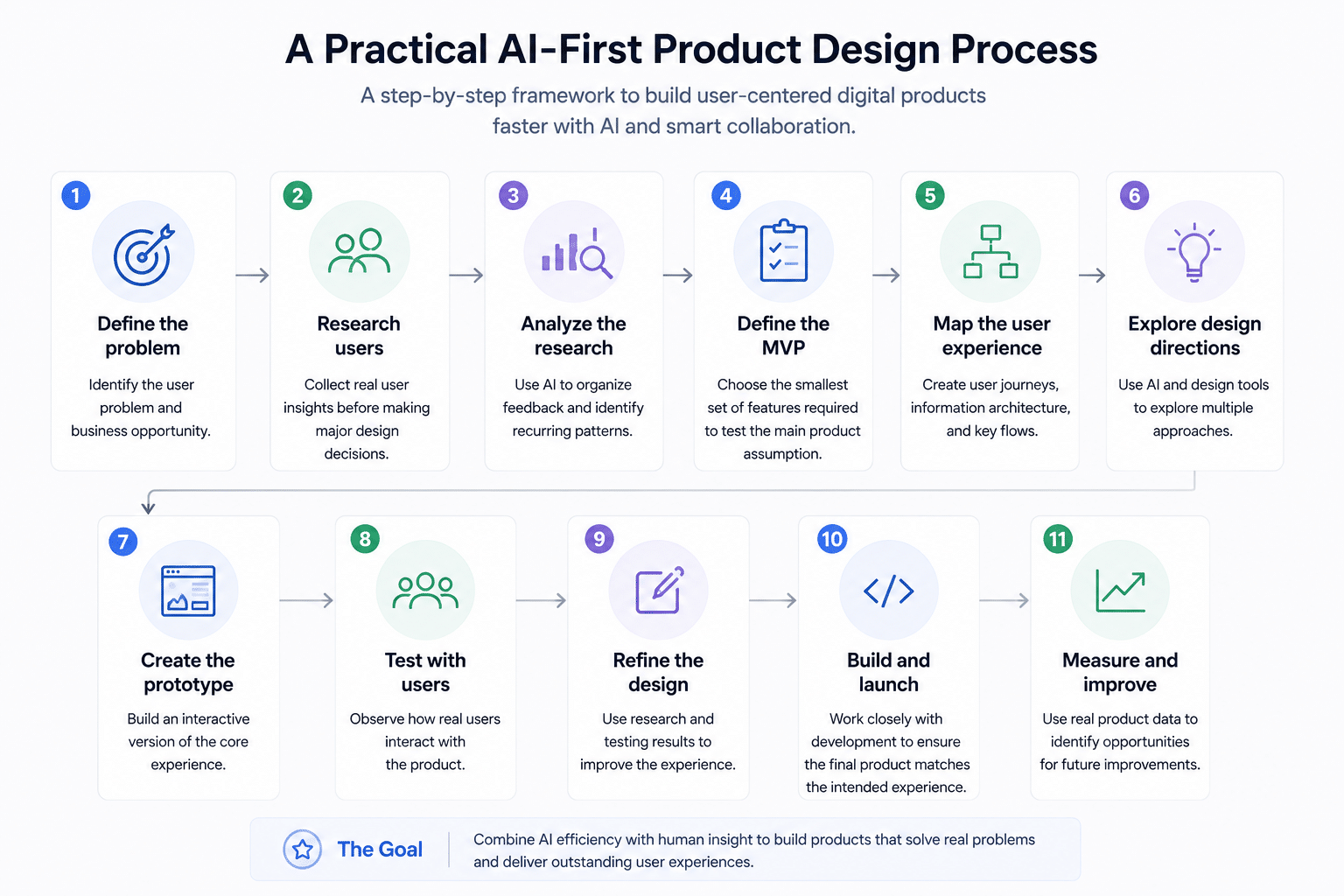
Step 1: Define the problem.
Identify the user problem and business opportunity.
Step 2: Research users
Collect real user insights before making major design decisions.
Step 3: Analyze the research
Use AI to organize feedback and identify recurring patterns.
Step 4: Define the MVP
Choose the smallest set of features required to test the main product assumption.
Step 5: Map the user experience
Create user journeys, information architecture, and key flows.
Step 6: Explore design directions
Use AI and design tools to explore multiple approaches.
Step 7: Create the prototype
Build an interactive version of the core experience.
Step 8: Test with users
Observe how real users interact with the product.
Step 9: Refine the design
Use research and testing results to improve the experience.
Step 10: Build and launch
Work closely with development to ensure the final product matches the intended experience.
Step 11: Measure and improve
Use real product data to identify opportunities for future improvements.
The Future of Product Design Is Not Just AI
AI will continue to change product design. Designers will use more automated tools. Developers will work with AI-assisted development systems. Founders will prototype products faster. Product teams will analyze more information in less time. The fundamentals will remain.
Successful products still need:
- A clear problem
- A strong product strategy
- Real user understanding
- Simple experiences
- Good information architecture
- Usable interfaces
- Consistent design systems
- Technical feasibility
- Continuous testing
- Measurable business outcomes
AI can accelerate these activities. It cannot replace the reason behind them. For founders, the opportunity is to use AI to remove unnecessary effort while investing more time in the decisions that shape the product.
The future of product design is not about designing faster. It is about using technology to make better product decisions faster.
Frequently Asked Questions
Is AI replacing product designers?
No. AI can automate repetitive design tasks and support research, ideation, prototyping, and development. Product designers still provide user understanding, strategic thinking, decision-making, and experience design.
How is AI used in product design?
AI can support user research analysis, ideation, UX flows, wireframes, UI exploration, prototyping, content creation, usability analysis, design systems, and development.
Can AI design an entire digital product?
AI can help generate large parts of a digital product, but a complete product still requires product strategy, user research, UX decisions, technical planning, testing, and human review.
Is AI useful for MVP development?
Yes. AI can help teams explore ideas, create prototypes, generate early interfaces, and speed up development. Teams still need to control MVP scope and validate the product with real users.
Will AI replace UX/UI designers?
AI is more likely to change the role of UX/UI designers than remove it. Designers will spend more time on strategy, research, problem-solving, validation, and product decisions while AI handles more repetitive production work.
How can startups use AI in product design?
Startups can use AI to analyze research, explore concepts, create prototypes, test ideas, support development, and analyze product feedback. The process should still begin with a clear user problem and product strategy.
Final Takeaway
AI has lowered the time and effort required to create digital product concepts. That creates a major opportunity for founders. Teams can explore more ideas, test concepts earlier, and move from strategy to prototype faster. The risk is that faster production can also create unnecessary features, weak UX, and products that solve the wrong problem.
The strongest product development process combines AI capabilities with human-centered product design.
- Use AI to accelerate the work.
- Use research to understand users.
- Use strategy to decide what to build.
- Use design to make the product easy to use.
- Use testing to learn what works.
- Use product data to keep improving.
That is how AI can become an advantage in product design instead of simply becoming another tool in the stack.